

The lowest nightly rate can lead to the highest checkout total. If you’re wondering what Vacasa doesn’t tell you about fees, look beyond the first price you see and read every line of the quote before booking your Ouray getaway.
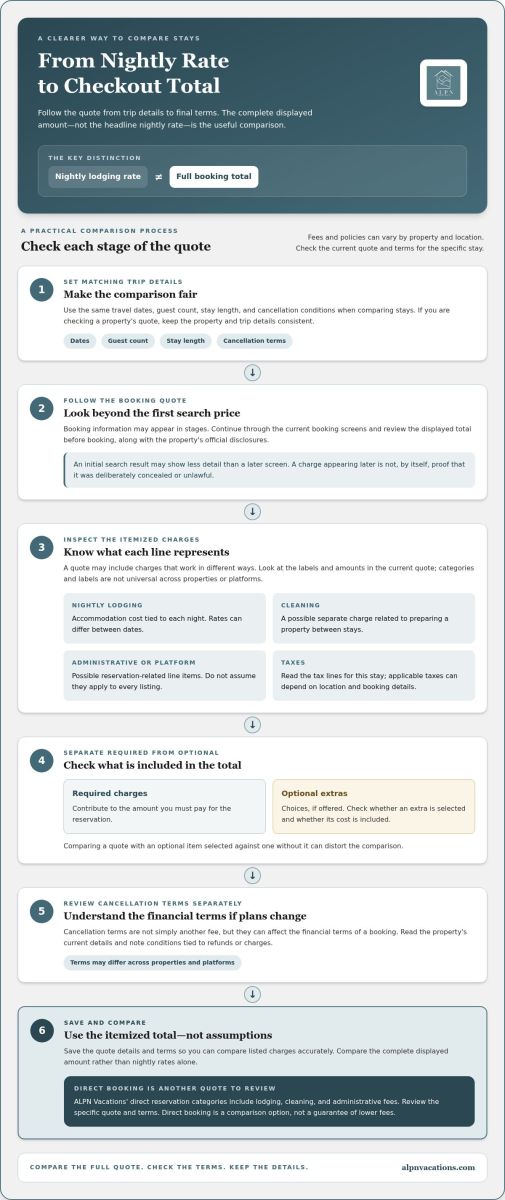
It’s easy to compare nightly rates and overlook how cleaning charges, booking fees, taxes, or optional extras affect the final amount. Vacasa’s guest fees and policies can vary by location, so the checkout total and booking terms matter more than assumptions based on another property. This guide explains which charges to look for, how to compare stays using the same dates and guest details, and what to review in the cancellation terms. It also covers direct booking as another way to review a property’s full quote. Direct reservations may still include lodging, cleaning, and administrative fees. With a consistent comparison, you can choose an Ouray stay with a clearer picture of what you’ll pay.
Key Takeaways
- “What Vacasa doesn’t tell you about fees” reflects a concern about fee transparency, not proof that charges are intentionally concealed.
- Separate nightly lodging charges from per-reservation fees. Treat cleaning or administrative charges as possible line items, not universal fees.
- Compare options using the same dates, guest count, stay length, and cancellation conditions so the totals are meaningful.
- Review the itemized quote and terms, then save the details to compare listed charges accurately before booking.
- Direct booking with locally owned ALPN Vacations is another way to review an Ouray property’s quote and terms, not a guarantee of lower fees.
What Does “What Vacasa Doesn’t Tell You About Fees” Really Mean?
A stay can look within budget at the nightly rate, then cost more once additional charges appear in the booking quote. That difference is worth examining when you’re planning a trip to Ouray and want to understand the full cost before committing.
The phrase what Vacasa doesn’t tell you about fees describes a concern about fee transparency. On its own, it doesn’t prove that Vacasa intentionally concealed a charge or acted unlawfully. Focus on the practical questions: what does the quote include, which charges apply to this reservation, and when do they appear? Vacation rentals can involve different parties and ways of managing a property. This general overview of vacation rental fee structures offers broader context, but it isn’t a current Vacasa fee schedule.
For a fair comparison, use the total shown for the same property, dates, and guest count before booking. The trip details matter: changing the length of stay or number of guests can change the quote, and another property may have different charges and terms. Compare the complete displayed amount rather than the nightly rate alone.
Why the nightly rate is not the whole booking price
A per-night rate describes one part of a reservation. The total reflects the full stay and the charges included in the quote. Depending on the property and booking, line items to inspect may include cleaning, administrative, platform, or tax charges. These are categories to look for, not a claim that every charge applies to every Vacasa booking. Check the current quote and official disclosures for the charges and amounts tied to that reservation.
For example, two listings might show similar nightly prices but different totals after you enter matching travel dates and guest details. One quote may show a separate cleaning charge, while another may present its charges differently. The headline rates alone can’t show which stay costs less overall; compare the itemized totals.
What “doesn’t tell you” should, and should not, imply
Booking information may appear in stages, with an initial search result showing less detail than a later booking screen. That can be frustrating, but it isn’t evidence on its own that a fee was deliberately hidden or unlawful. Review the current Vacasa disclosures as you proceed, note when each charge appears, and read the terms for the specific property. Policies and property-level charges can change, so an old quote or another guest’s experience may not reflect your reservation.
A transparent comparison uses the same trip details and checks every displayed charge in the final pre-booking total. This gives you a consistent basis for deciding whether a stay suits your budget, without assuming that a low nightly rate tells the whole story.
Which Vacation-Rental Fees Can Change the Total?
A booking total can combine charges that work in different ways. The nightly lodging rate is tied to the accommodation and length of stay. Other line items may be added once per reservation, calculated separately, or applied only when relevant. Knowing the categories helps explain why a final quote differs from a simple nightly figure.
Nightly rate, cleaning, and administrative charges
Nightly lodging charge: the cost of the accommodation for each night. Consider the quoted nightly rate across the stay, while remembering that rates can differ between dates.
Cleaning fee: a possible charge related to preparing a property between stays. It may appear separately from lodging, and neither its presence nor its label is universal across properties or booking platforms.
Administrative fee: a possible reservation-related charge for handling booking tasks. It’s distinct from the nightly lodging rate, but don’t assume every rental uses this label or charges it. ALPN Vacations’ reservation categories include lodging, cleaning, and administrative fees. For an ALPN property, review the specific quote to see how those categories appear for your dates and stay.
For Vacasa, read the labels and charges in the current property quote and its official disclosures. Don’t assume that a fee used by one rental company applies to every Vacasa listing, or that similarly named line items cover the same thing everywhere. Labels can differ even when two charges sound alike.
Taxes, optional extras, and booking terms
Taxes also contribute to the final figure. Which taxes apply can depend on the property’s location and booking details, so read the tax lines in the quote for the specific stay. Don’t estimate them using another property or an older booking. For Vacasa, use the current disclosures and checkout details rather than relying on a general description of tax or fee treatment.
Separate required charges from optional extras. A required charge contributes to the amount you must pay for the reservation; an optional add-on is a choice, if offered. Check whether an extra has been selected and whether its cost is included in the displayed total. Comparing one quote with an optional item selected against another without it can distort the comparison.
Cancellation terms deserve a separate review. They aren’t simply another fee, but they affect the financial terms of a booking if plans change. Read the property’s current cancellation details alongside the itemized quote, and note any conditions tied to refunds or charges. Don’t assume terms are identical across properties or platforms.
For an Ouray stay, review ALPN Vacations’ direct booking options as another property quote to compare. Direct booking is a comparison option, not a promise that every fee disappears or that one total will always be lower. Match the dates, guest count, and terms, then assess each charge in context.
How to Compare Vacasa’s Total With Another Vacation Rental
A useful comparison starts with matching trip details, not similar-looking nightly rates. Enter the same dates, guest count, and stay length for each option. Then compare cancellation conditions and the full amount shown before booking. If booking pages display charges at different stages, record when each total appears so you’re comparing quotes at the same point in the process.
Make it a like-for-like booking comparison
Use one simple worksheet for both quotes. Copy figures and labels as displayed rather than guessing what a charge covers. If a line item is missing or unclear, mark it “unknown,” not zero. An empty cell shouldn’t make one stay appear cheaper. This record keeps the comparison consistent and makes it easier to revisit the quote later.
- Enter identical dates, guest numbers, and stay lengths.
- Record the nightly subtotal and each required fee separately.
- Note taxes, optional extras, and the cancellation conditions shown.
- Write down the final total and when it was displayed.
Use a table like this to keep each component visible:
| Quote line | Vacasa | Another rental |
|---|---|---|
| Nightly subtotal | Record quote | Record quote |
| Mandatory fees | Record or mark unknown | Record or mark unknown |
| Taxes | Record or mark unknown | Record or mark unknown |
| Optional extras | Record selected items | Record selected items |
| Final total | Record displayed amount | Record displayed amount |
The final total is more useful than a single-night headline rate because it reflects the charges attached to your complete stay. The phrase what Vacasa doesn’t tell you about fees may prompt a closer look, but a consistent side-by-side record helps you judge actual quotes rather than rely on assumptions.
Compare the stay, not only its fees
A lower total doesn’t automatically mean better value if the property doesn’t fit your plans. Compare location, sleeping arrangements, pet rules, and cancellation conditions alongside the price. For an Ouray getaway, consider how close each option is to the town center and the activities on your itinerary. A convenient location may matter more than a small difference in the total.
Ask the same practical questions about each listing: will everyone have suitable sleeping arrangements, does the property’s pet policy suit your group, and are the cancellation terms acceptable? Keep those details beside the fee table rather than letting one number decide the comparison. For local context as you weigh where to stay, explore this Ouray CO cabin rentals guide.
A Booking-Page Checklist Before You Pay
A careful final review can catch mismatched trip details, an optional add-on, or a term that affects your decision. Follow the same sequence for each rental: enter your trip details, inspect the itemized quote, review the booking terms, and compare totals. Take your time before submitting payment.
Read the itemized quote from top to bottom
Start by checking that the dates and guest count match your plans. Then read every line instead of jumping straight to the final figure. Identify which charges are required or optional, and whether they apply per night or per reservation. If a label is unfamiliar, use the current booking disclosure to understand it rather than guessing from the name.
- Enter trip details. Set the intended dates and guest count, and check the stay length.
- Inspect the quote. Review the nightly subtotal, each displayed charge, taxes, and any optional extras.
- Review the terms. Read the property’s cancellation policy and note any conditions that affect refunds or payment.
- Compare totals. Check that you’re comparing the same trip details and equivalent required charges.
Before continuing, look for the final amount and any payment schedule shown on the booking page. Save the quote or record its line items, date, and trip details. If you return to it later, confirm that the details and displayed total still match. This record helps prevent confusion when comparing properties or resuming a booking after a pause.
For Vacasa, rely on the current property quote and disclosures rather than an old screenshot or a description of another listing. Fee labels and property-specific terms can differ, so verify what applies to the reservation in front of you. This is a practical way to investigate what Vacasa doesn’t tell you about fees without mistaking a fee category for a charge that necessarily applies to every stay.
Check cancellation terms and trip fit
Cancellation policies can vary by property and booking, so read the terms attached to the specific stay before paying. Check whether optional extras are selected, and make sure the property’s pet policy, occupancy, and key amenities fit your group. A quote is useful only if it reflects a stay that works for everyone traveling.
Choose dates and a location that support your plans in Ouray. Consider how the property’s setting fits the activities on your itinerary, and use this Ouray local activities guide to help shape your stay. Then browse ALPN Vacations’ Ouray stays as another direct-booking option, reviewing each property’s quote and terms with the same care.
Booking an Ouray Stay Directly With ALPN Vacations
A locally operated booking option gives you another quote to review as you plan your time in Ouray. ALPN Vacations is locally owned and operated in Ouray, Colorado, and guests can make reservations directly. Direct booking is a comparison choice, not a promise of lower fees or a particular final price. As with any rental, focus on the specific property’s quote and terms for your trip.
What a direct ALPN reservation offers
ALPN’s rentals include cabins, pet-friendly homes, and luxury properties across Southwest Colorado. Reservations and guest services are handled through the company’s Ouray office. This provides a local point of connection during your stay, while charges remain specific to the reservation. ALPN’s per-reservation categories include lodging, cleaning, and administrative fees. Review the property quote to see its applicable charges and terms.
Those categories describe the structure of an ALPN reservation; they don’t establish what another company charges or how its booking page labels fees. When comparing a Vacasa listing with an ALPN stay, use each property’s current quote rather than assuming direct booking removes platform charges or makes the total lower. The goal is a clear comparison, not a predetermined winner.
Choose a stay that fits your trip and budget
Look beyond the amount due. Confirm that the property suits your group’s sleeping arrangements, pet needs, preferred location, and plans in Ouray. Then compare the complete quote, applicable charges, and booking terms with your alternatives. If something appears optional, note whether it’s selected. If a detail is unclear, don’t treat it as a confirmed cost or assume it is included.
ALPN’s Ouray rental management and local hosting guide offers context on local vacation-rental operations. For your booking decision, focus on the guest-facing property details: dates, total shown, fee categories, and applicable terms. That’s a steadier way to address the concern behind what Vacasa doesn’t tell you about fees than relying on a nightly rate or broad assumptions about how every rental company works.
Once you’ve decided what matters for your getaway, take a look at the available Ouray vacation stays. Review the details of the property you’re considering, then compare its full quote with the same care you’d give any booking. A comfortable mountain stay begins with a clear sense of both the place and the reservation.
Make Room for the Stay You’re Looking Forward To
Let the full booking total guide your decision, not the first number that catches your eye. Once you know what fits your trip budget, focus on the details that make an Ouray getaway feel right, from a quiet place to unwind to a comfortable base for exploring the mountain town. The question of what Vacasa doesn’t tell you about fees is ultimately a reminder to make your choice with the complete cost in view.
If you’re considering another booking option, explore ALPN Vacations’ Ouray rentals and review the details for the stay that interests you. ALPN is locally owned and operated in Ouray, with direct reservations and guest services handled through its Ouray office. Choose among cabins, pet-friendly homes, and luxury properties, then consider how each fits your plans and budget.
Explore Ouray vacation rentals with ALPN Vacations, and take the next step toward a stay that feels comfortable, considered, and distinctly your own.
Frequently Asked Questions
Does Vacasa charge fees in addition to the nightly rate?
Yes. A Vacasa reservation may include charges beyond nightly lodging, such as a booking fee or cleaning fee, and property-specific charges can vary. That’s the practical concern behind what Vacasa doesn’t tell you about fees: a search-page rate may not reflect the full amount for the stay. Open the itemized quote for your chosen property and dates, then use its current disclosures to identify applicable charges before paying.
Are cleaning fees included in the total price shown for a vacation rental?
They may be included in a displayed total while also appearing as a separate line item, but don’t assume every search result shows them upfront. Check the itemized quote to see whether cleaning is listed separately and included in the final amount. If you’re splitting costs among travelers, use the full reservation total rather than dividing only the nightly rate, which can leave out reservation-level charges.
Do vacation-rental fees vary by property and length of stay?
Yes. Property-specific charges can differ, and the number of nights can affect the lodging subtotal and any nightly charges. Other fees may be associated with the reservation rather than each night. Comparing a short stay with a longer one at a different home can change both the total and the mix of charges. Use the quote generated for the exact property and stay you’re considering.
Are taxes included in the vacation-rental price displayed before checkout?
Not always in the first price you see. Some booking flows show a nightly rate or partial quote before presenting taxes in a more detailed breakdown. Check the current quote for a distinct tax line and confirm whether it’s included in the displayed total. Tax details depend on location and booking specifics, so don’t carry a figure from a previous stay or a different town into your Ouray trip budget.
What happens to vacation-rental fees if I cancel my reservation?
It depends on the property’s cancellation terms, the timing, and the booking platform. Vacasa’s stated guest policy allows a full refund for cancellations within 24 hours of booking. After that, cancellations made at least 30 days before check-in may receive rental payments back minus the booking fee and associated taxes; exceptions can apply. Read the current terms for your reservation before booking, since the policy may differ by location.
Does booking a vacation rental directly always cost less than booking through a platform?
No. Direct booking gives you another quote to compare, but it doesn’t guarantee a lower total. A direct reservation may still include lodging, cleaning, and administrative fees, while a platform may add its own charges. Compare the same property, dates, guest count, and terms, and check which charges are included in each displayed total. For an Ouray stay, the right choice is the one that fits your plans and budget.
How can I compare the total cost of two vacation rentals accurately?
Use matching dates, guest numbers, and stay lengths, then compare each quote’s complete amount and cancellation conditions. Note whether extras are selected, and don’t treat a blank or unclear charge as zero. Also compare what matters to your trip, such as sleeping arrangements, pet rules, and location. In Ouray, a property’s position relative to your planned activities can affect its value beyond the amount shown at checkout.